For IT teams and managed-service providers
Every client’s equipment, on one register.
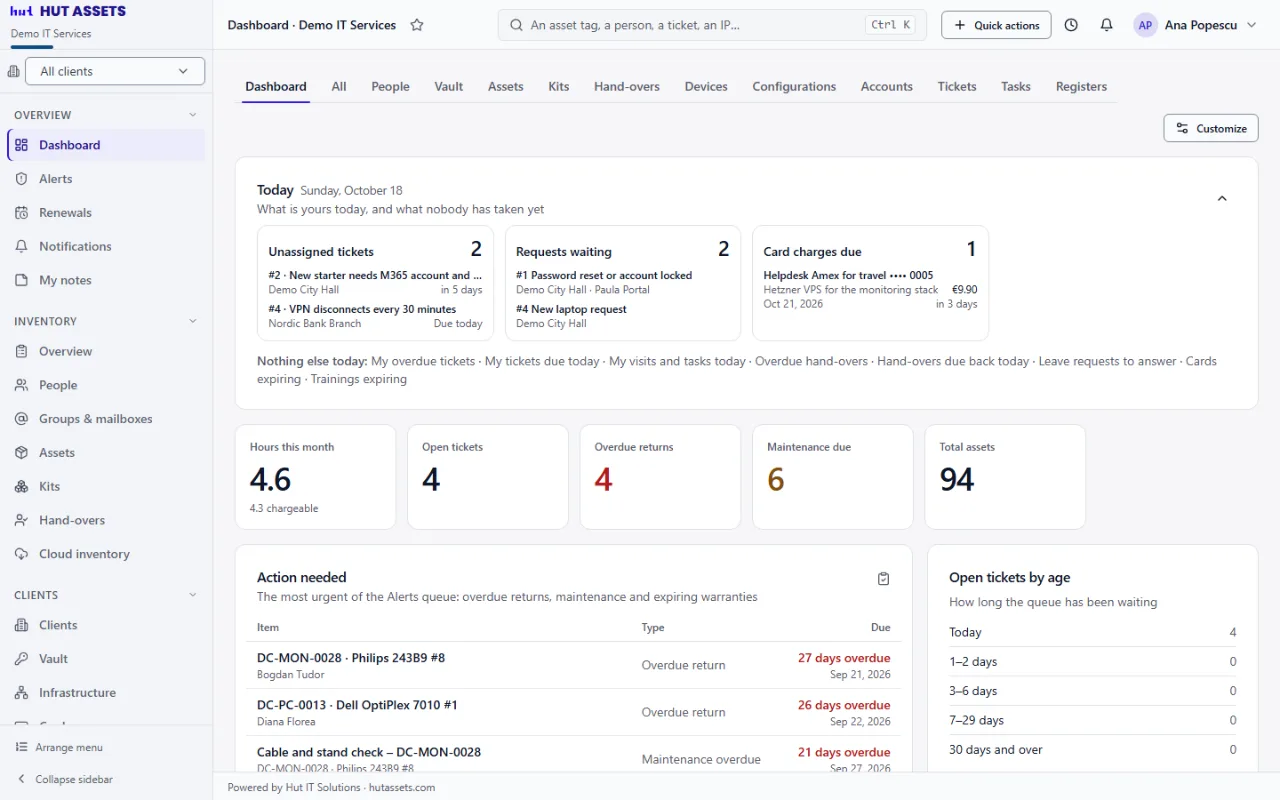
Laptops, licenses, passwords, tickets and the hours you spend on them, for every client you look after, in one system. Choose a client in the top bar and everything on screen is theirs.
Already have an account? Sign in with the work e-mail address it was made for.
- Client
- Larkfield Care HomesBramley House · IT & Facilities
- Who has it
- Ana PetrescuSince 14 March 2026 · signed for
- License
- Microsoft 365 Business Premium Seat 12 of 25
- Warranty
- 22 November 2027 In cover
- Password
- Local administrator · every reveal is recorded
•••••••••••• - Open ticket
- #2184 Battery swelling In progressDue 25 Aug 2026 under their SLA
What it holds
One record per thing, and the same table under all of them.
Choose your columns, put them in the order you want, freeze the first, save the view, and export exactly what you filtered to Excel, PDF or CSV. That holds for every list here, including the ones you build yourself.
What you keep
Assets
Every laptop, printer and license in one list, each category asking only for the fields that matter to it. A license counts its seats as you hand them out.
Hand-overs and kits
Who holds which device and since when. A kit goes out and comes back as one, and when somebody leaves you see what is still with them.
Infrastructure
Servers, switches, printers, cameras and shared drives at each site, with their IP, MAC and location. If an address is already taken at the site, you are told while you type.
Groups & mailboxes
Email groups, shared mailboxes, SharePoint sites and Teams per client, with their members, read from Microsoft 365 or Google Workspace if you like. Mark the lists everybody should be on and see who is missing.
Cloud inventory
Users, devices and licenses read from Microsoft 365 or Google Workspace. Nothing changes in your records until you approve it.
Vault
Client passwords, keys and Wi-Fi codes, encrypted and opened only by your team. Every reveal is recorded, and the client never sees them.
Cards
The payment cards you keep for the business and its clients, every field encrypted. Each look asks for a reason and a code from the authenticator app, and goes in the Activity log.
How the work runs
Tickets
Numbered per client with due dates from that client’s SLA; internal notes stay internal, and clients can raise and follow their own.
Tasks
Maintenance, site visits, new starters and supplier follow-ups: given to someone and reminded before they slip.
Scheduling
Who goes where and what gets done: visits and tasks, a week as a list or a month as a calendar.
Renewals
License and subscription renewals, warranties running out, cards expiring and card charges, on one calendar. Each one opens its record.
Development
The websites and software you build for clients: the plan, the backlog, documentation you can share with them, and the hours logged against it.
Alerts
Every warning the system can raise, in one place, most urgent first, until each one has been dealt with.
Search
One box at the top finds a person, a device, a serial number, an IP address or a ticket, from whichever page you are on.
What keeps the record straight
Knowledge
Runbooks, procedures and the notes your team keeps for itself. None of it is shown to a client.
Registers
A list we haven’t thought of: your own columns, and rows you can hand to a person, a device or a kit.
Work log and accounting
Time spent away from tickets goes in the work log. A quote goes out before the work, and a statement when the month closes, at each client’s own rate.
Compliance
Risks, policies, training and patching, client by client, with a heat map that shows what to deal with first.
Attendance
Your own staff’s monthly sheet of hours, leave and holidays, kept apart from everything client-facing.
Import and export
Start from the spreadsheet you already keep, see what would be rejected and why, then apply it; everything leaves again as Excel, PDF or CSV.
Reports and dashboards
Equipment by category, site or department; value, warranties, overdue returns and costs, pinned to a dashboard you arrange yourself.
Record history and recycle bin
Every change is recorded, and deleting is not final: records wait in the recycle bin for the period you set.
On a phone
Every page is laid out for a phone. Add it to the home screen to open it like an app, and scan a label with the camera to find the asset.
Per client
Choose the client once. Everything else follows.
The client you choose in the top bar is applied by the database itself, not by a filter each page has to remember. Lists, reports, dashboards, documents, credentials and history all narrow to that client, and “All clients” brings everything back. Try it:
| Tag | Item | Client | Who has it | Status |
|---|---|---|---|---|
| HUT-LT-0148 | ThinkPad T14 Gen 4 | Larkfield Care Homes | Ana Petrescu | Issued |
| HUT-PR-0032 | HP LaserJet M479 | Larkfield Care Homes | Shared · reception | Issued |
| BRM-DK-0211 | OptiPlex 7010 Micro | Bramley Group | Marcus Hale | Issued |
| BRM-LC-0007 | Microsoft 365 · seat 4 of 40 | Bramley Group | Priya Raman | Issued |
| NGD-LT-0091 | MacBook Air M3 | Northgate Dental | — | In stock |
| NGD-NW-0004 | UniFi Switch Lite 16 | Northgate Dental | Server room | In service |
Showing 6 of 6 records · all clients
Security
You hold data that isn’t yours.
Serial numbers, staff records and administrator passwords belong to your clients. That is the reason for the parts of HutAssets nobody sees.
Separation
One business cannot see another’s
It is not only application code keeping them apart: PostgreSQL filters every table by the business that owns the row, so a condition missing from a query cannot expose anything.
Encryption
Credentials are sealed to their record
Each vault entry and each card is encrypted together with the record it belongs to. Move the encrypted value to another row and it will not open.
Two-step sign-in
A code as well as a password
Anyone can add an authenticator app to their sign-in, and the business can require it by role. If the phone is out of reach, a one-time code can go to the account’s own address, where the business allows it.
Sign-in
Repeated attempts cost time
Too many failures lock that address for fifteen minutes, and an email address we have never seen is refused in exactly the same time as one we know.
Sessions
Access you can withdraw
A password change, a change of role or a deactivated account ends the sessions already open. An access token is valid for fifteen minutes.
Roles
Clients see only their own
A client contact sees their people, equipment, tickets and the pages you shared with them. Never the audit log, never the vault, never another client.
Oversight
A security summary every month
On the first of the month your administrators and asset managers get one letter: who opened cards and vault entries, how often, and which codes and sign-ins were refused.
Continuity
Nightly backups, a written restore
The database and every uploaded document are backed up each night and kept for a set period, and the steps to bring them back are written down rather than improvised.
Hours
The hours stay where the work happened.
Minutes go on the ticket reply that used them. Everything off-ticket, such as the site visit, the phone call or the afternoon on a project, goes in the work log. At the end of the month the total is already there, per client.
The rate lives on the client
Billing model, rate, currency and the day the report goes out are all on that client’s own page.
Unbilled work is still shown
It appears on the report, so the client can see what they received. It is not charged.
The report knows who to write to
It reaches the client’s standing recipients, or any address you add for a single send.
A quote before, a statement after
Send a quote before the work starts; when the month closes, its statement keeps the figures as they were.
Questions
Questions we are asked
Who is HutAssets for?
Helpdesk and managed-service teams looking after several clients at once. If you keep a spreadsheet per client today, this replaces all of them with one system that still knows which client is which.
Can our clients sign in themselves?
If you want them to. A client contact sees their own people, equipment and tickets, raises tickets in their own name and follows them. They see nothing about your other clients.
Can we bring across what we already have?
Yes. Map your spreadsheet’s columns to the fields, see exactly what would be rejected and why, then apply it. We do the first import with you.
What happens to our data?
It stays yours. Every list exports to Excel, PDF or CSV whenever you want it, deletions can be undone for a period you set, and the database is backed up every night.
How do people sign in?
With their work e-mail address and a password they choose from the invitation letter. Two-step sign-in with an authenticator app can be required for any role. Your clients sign in at the same address and see only their own.
Does it work on a phone?
Yes. Every page is laid out for a phone, it can be added to the home screen and opened like an app, and a label can be scanned with the camera to find the asset it belongs to.
Is it available in Romanian?
The whole application is in Romanian and English, and each person chooses their own. Changing language changes nobody else’s screen.
Getting started
Start with what you already have.
Tell us how many clients, people and devices you look after. We show it to you live, set your business up with its own workspace, help you import what you have, and you carry on from there.